
The latest amendments to the VAT Rulebook, effective from 1 April 2026, introduce certain clarifications regarding the Notification of the Recipient concerning input VAT.
This refers to a statement issued by the customer to the supplier after the supplier has issued a credit note or a cancellation (reversal) invoice.
If you are acting as a seller (supplier) who has issued a credit note or a cancellation invoice to your customer, you may reduce your VAT liability only after receiving a Notification from the customer confirming that they have adjusted their input VAT deduction, or that they did not claim input VAT based on the original invoice which has subsequently been cancelled or for which a credit note has been issued.
Until now, such a statement could be provided either as a separate document or by marking/completing the relevant fields on the cancellation invoice or credit note received from the supplier.
The amended regulations now stipulate that the Notification may be issued only after receipt of the cancellation invoice or the document on reduction (credit note), and that it may be issued in electronic or another form, but must be delivered electronically.
For users of the e-Invoice System (SEF), it may be most practical to become familiar with this form within the eFaktura system and, if needed, issue Notifications directly to suppliers through SEF.
The Notification form can be accessed by selecting the appropriate section at the bottom of the left-hand menu in SEF.
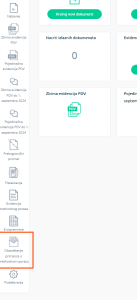
Upon opening this section, you can choose between the list of received Notifications and the list of issued Notifications.
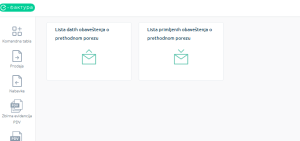
Within the issued Notifications section, it is possible to create, complete, and send a Notification manually, directly through the Electronic Invoicing System. The button for creating a new Notification is located in the upper right corner.
You can also access the form directly from the received invoice supplier cancelled.
If supplier issued and cancelled an invoice aftrwards, open the invoice, and at the bottom you will find a shortcut to create Notification (Kreiraj obaveštenje o prethodnom porezu).

The form is very simple and contains only the mandatory, prescribed elements.
In addition to general information, the form requires entering details of the supplier’s document on the basis of which the Notification is issued.
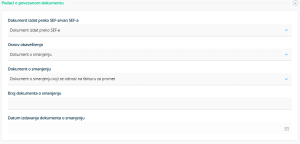
You must indicate whether the supplier has issued a cancellation or a credit note in relation to an invoice that was originally issued through SEF or not. Then, you need to select whether the document is a reduction document (in case of a credit note) or a cancellation (if the supplier has cancelled a document such as an invoice, advance invoice, or increase document). If it concerns the cancellation of an invoice, you will need to enter the invoice number, its original issue date, and the date of cancellation.
After that, you need to enter the amount of VAT stated by the supplier in the cancellation invoice or reduction document. This is the amount by which VAT is reduced due to the cancellation or issuance of a credit note.
At the bottom of the document, there is a button to save and send the Notification.
The list of received Notifications is used when you are acting as a seller, while the list of issued Notifications is used when you are acting as a customer.
An alternative to issuing the Notification directly through SEF is to issue it as a separate document, in electronic or another format, and send it electronically.
0 Comments